
Gaok1/Raven-RiscV
Gaok1/Raven-RiscV has 113 GitHub stars and 5 forks. GitHot measured 0 stars in 24 hours. Last checked 2026-11-09 21:59 UTC. Last push 2026-11-03.
So werden diese Zahlen gemessen
RISC-V simulator and IDE for learning assembly — RV32IMF, step-by-step debugger,cache , pipeline, multi-core simulator
Gemessener Sternzuwachs
- in 24h
- 0
- in 7 days
- Aktualisierung verzögert
- in 15 days
- Aktualisierung verzögert
- in 1 month
- Aktualisierung verzögert
Nettoänderungen in überlappenden Zeiträumen, keine Tagessummen. Fehlende Messwerte bleiben leer. Sterne zeigen Interesse, nicht Qualität.
README.md
OriginalRAVEN — Multi-Architecture Assembly Simulator & IDE
RAVEN is a free, open-source assembly simulator and terminal IDE for students and anyone learning computer architecture. Its flagship backend is RISC-V (RV32IMAF) — the full base integer set, multiply/divide, atomics, and single-precision float, with a full virtual-memory/TLB model, JIT, and multicore — and it makes every part of the machine visible while your program runs. Three smaller teaching backends — x86-64, SAP, and Toy16 — are also built in; see Other Architectures.
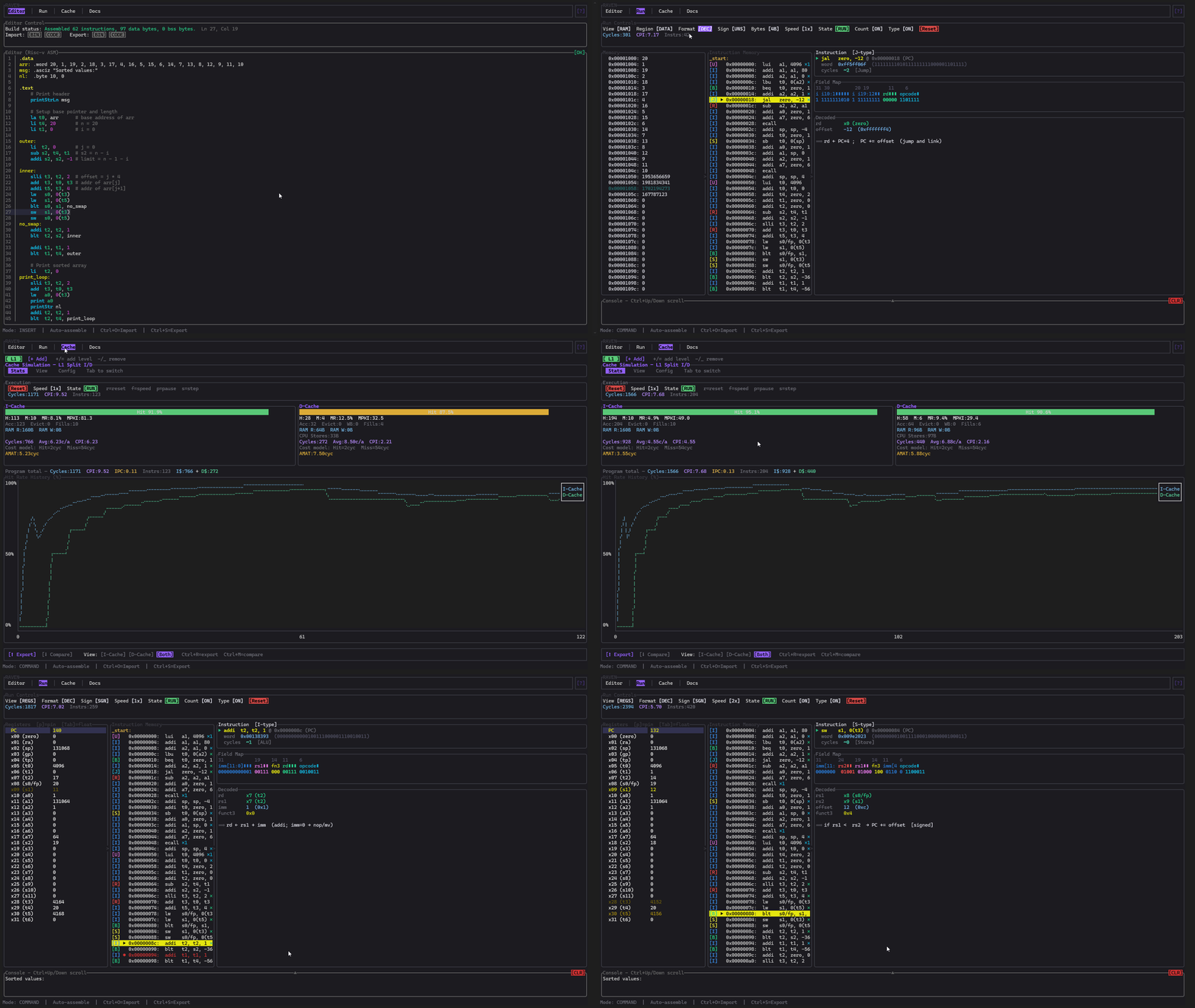
Write assembly in the built-in editor, assemble with Ctrl+Enter, and step through every instruction watching registers, memory, and the cache update in real time. Nothing is hidden.
Quick Start
Download the latest binary from Releases, or build from source:
git clone https://github.com/Gaok1/Raven-RiscV.git
cd Raven-RiscV
cargo run
Requires Rust 1.85+ (the crates use the 2024 edition). On Linux, building from source also needs pkg-config and the GTK 3 development files (libgtk-3-dev on Debian/Ubuntu); the prebuilt binaries need nothing extra.
What you get
The tabs below show the full experience with the flagship RISC-V (RV32IMAF) backend loaded. Switching to x86-64, SAP, or Toy16 (a on the Settings screen, or --arch <id> on the CLI) reuses the same editor, debugger, cache, and pipeline UI, but each backend only lights up what it actually models — see Other Architectures.
Editor (Tab 1)
- Syntax highlighting — instructions, registers, labels, directives, strings
- Ghost operand hints while typing
Ctrl+Enterto assemble instantly; errors show line number and reason- Undo/redo (50 levels), word navigation, toggle comment (
Ctrl+/), select next occurrence (Ctrl+d) - Go-to-definition (
F12), label highlight, address gutter (F2)
Debugger — Run Tab (Tab 2)
- Run free (
r), pause (p), restart (R), or single-step (s) - Breakpoints (
F9), jump to label (Ctrl+g), jump to RAM address (Ctrl+f), execution trace (t) - All 32 integer registers with ABI names, change highlighting
- Float registers (
f0–f31/ ABI names), toggled withTabin REGS mode - Sidebar cycles with
v: RAM → Registers → Dyn- RAM: scrollable memory view;
kcycles region: Data / Stack / R/W / Heap (sbrk pointer,▶HBmarker) - R/W: still RAM view, but auto-follows the last memory access address from
LOADandSTORE - Registers: integer or float register bank with per-register age highlighting; pin with
P - Dyn: self-narrating mode for single-stepping — STORE → RAM centered on the written address (
▶); LOAD / ALU / branch → register bank so you see the result
- RAM: scrollable memory view;
- Instruction memory panel: type badge
[R]R-type ·[I]I-type ·[S]Store ·[B]Branch ·[U]Upper ·[J]Jump ·[A]Atomic ·[F]Float; execution heat×N, branch outcome - Instruction decoder: full field breakdown (opcode, funct3/7, rs1/rs2/rd, immediate, sign-extended)
Cache Simulator (Tab 3)
- Separate I-cache and D-cache, plus unlimited extra levels (L2, L3…)
- Configurable: sets, ways, block size, write policy (write-through/write-back + allocate/no-allocate), inclusion policy (non-inclusive/inclusive/exclusive)
- Six replacement policies: LRU, FIFO, LFU, Clock, MRU, Random
- Live stats: hit rate, MPKI, RAM traffic, top miss PCs
- Academic metrics: AMAT (hierarchical), IPC, CPI per instruction class
- Visual matrix view: every set and way, valid/tag/dirty state, scrollable
- Multicore cache coherence: one shared L1, or a private L1 per core kept coherent by MSI, MESI or MOESI (or by nothing, to see stale data) — with line states, bus requests and per-core bus traffic in the Coherence subtab (guide)
- Export results (
Ctrl+r) to.rstats/.csv - CPI configuration: per-class cycle costs (ALU, MUL, DIV, LOAD, STORE, branch, JUMP, FP…)
Pipeline Simulator (Tab 4)
- Five-stage in-order pipeline visualization with per-cycle stepping and run/pause controls
- Main and Config subtabs for hazard/history inspection and pipeline configuration
- Branch resolve and predictor controls, bypass toggles, and hazard map visualization
- Export the unified config / results with
Ctrl+e,Ctrl+l, andCtrl+r
Docs Tab (Tab 5)
- Instruction reference for all supported instructions
- Run tab key guide
ISA Coverage — RISC-V (RV32IMAF)
| Extension | Instructions |
|---|---|
| RV32I | ADD, SUB, AND, OR, XOR, SLL, SRL, SRA, SLT, SLTU, ADDI, ANDI, ORI, XORI, SLTI, SLTIU, SLLI, SRLI, SRAI, LB, LH, LW, LBU, LHU, SB, SH, SW, BEQ, BNE, BLT, BGE, BLTU, BGEU, JAL, JALR, LUI, AUIPC, FENCE, FENCE.I, ECALL, EBREAK |
| RV32M | MUL, MULH, MULHSU, MULHU, DIV, DIVU, REM, REMU |
| RV32A | LR.W, SC.W, AMOSWAP.W, AMOADD.W, AMOXOR.W, AMOAND.W, AMOOR.W, AMOMAX.W, AMOMIN.W, AMOMAXU.W, AMOMINU.W |
| RV32F | FADD.S, FSUB.S, FMUL.S, FDIV.S, FSQRT.S, FMIN.S, FMAX.S, FEQ.S, FLT.S, FLE.S, FLW, FSW, FMV.W.X, FMV.X.W, FCVT.W.S, FCVT.WU.S, FCVT.S.W, FCVT.S.WU, FCLASS.S, FMADD.S, FMSUB.S, FNMADD.S, FNMSUB.S, FNEG.S, FABS.S |
Pseudo-instructions: la, li, mv, neg, not, ret, call, push, pop, seqz, snez, beqz, bnez, bgt, ble, fmv.s, fneg.s, fabs.s, and more.
Syscalls (ecall): print integer/string, read input, exit, random bytes — Linux-compatible ABI (a7 = syscall number).
The three smaller backends have their own, much smaller instruction sets — see Other Architectures below, or each backend's tab in the in-app Docs reference.
Other Architectures
RISC-V (RV32IMAF) is Raven's flagship backend — currently the only one with virtual memory, a JIT, multicore, and floating point. Three smaller teaching backends are also built in, reusing the same editor, debugger, cache, and pipeline UI. Switch with a on the Settings screen, or --arch <id> on the CLI:
| Backend | --arch id |
ELF | Cache | Pipeline | Virtual memory | JIT | Multicore | Float | Syscalls |
|---|---|---|---|---|---|---|---|---|---|
| RISC-V (RV32IMAF) | riscv32 |
yes | yes | yes | yes | yes | yes | yes | yes |
| x86-64 | x86_64 |
yes | yes | yes | no | no | no | no | yes |
| SAP | sap |
no | yes | yes | no | no | no | no | no |
| Toy16 | toy16 |
no | yes | yes | no | no | no | no | yes |
- x86-64 — an Intel-syntax integer/system core: moves, ALU ops, stack and control flow,
hlt, and Linux-styleread/write/exitsyscalls, with its own split I/D cache and a 5-stage pipeline view. No virtual memory, JIT, multicore, or floating point — a deliberately bare, single-core machine for studying x86 addressing modes and calling convention without RISC-V's regularity. - SAP — the classic 8-bit "Simple-As-Possible" teaching CPU: one accumulator, a 16-byte address space, and
out/putcfor I/O. No ELF loading and no syscalls — there's no operand width left to hang a calling convention on — just enough machine to teach fetch-decode-execute from first principles. - Toy16 — a tiny 16-bit ISA built to be deliberately different from RISC-V, so Raven's architecture-neutral tooling isn't accidentally RISC-V-shaped. Has its own registers, cache, and pipeline, plus a small
read/write/exitsyscall ABI, but no ELF loading, virtual memory, multicore, or floating point.
Loading ELF Binaries
RAVEN can load and execute ELF32 LE RISC-V binaries compiled by any standard toolchain. It is officially compatible with:
| Target | Support |
|---|---|
riscv32im-unknown-none-elf |
✅ Full |
riscv32ima-unknown-none-elf |
✅ Full |
Running a Rust no_std program
# 1. Add the target (once)
rustup target add riscv32im-unknown-none-elf

# 2. Build your project
cargo build --target riscv32im-unknown-none-elf

# 3. Open RAVEN, go to the Editor tab, click [BIN] and select the ELF
#    (found at target/riscv32im-unknown-none-elf/debug/<your-crate>)
The ELF is loaded at its linked virtual addresses, the PC is set to the entry point, and the disassembler shows the decoded text segment. Unknown words (data, padding) appear as .word 0x....
A ready-to-use project with _start, panic handler, allocator, and wrappers for write, read, and exit is available at rust-to-raven/.
Assembler
.text,.data,.bsssegments- Directives:
.byte,.half,.word,.dword,.float,.ascii,.asciz,.string,.space,.globl .word label— label addresses as data values (jump tables, pointer arrays)- Block comments (
##!) and inline annotations (#!) visible in the Run tab at runtime - Clear error messages with line numbers
Key Bindings
Global
| Key | Action |
|---|---|
Ctrl+Enter |
Assemble and load |
Run Tab
| Key | Action |
|---|---|
r / p |
Run / Pause |
s |
Single step |
R |
Restart simulation |
F9 |
Toggle breakpoint at PC |
f |
Cycle speed: 1× → 2× → 4× → 8× → GO |
v |
Cycle sidebar: RAM → Registers → Dyn |
k |
Cycle RAM region: Data → Stack → R/W → Heap |
Tab |
Toggle integer / float register bank (REGS mode) |
t |
Toggle execution trace panel |
Ctrl+f |
Jump RAM view to address |
Ctrl+g |
Jump instruction view to label |
Included Examples
Program Examples/ contains ready-to-run programs, grouped by topic:
| File | Demonstrates |
|---|---|
basics/ (print.s, sum_1_to_10.s, ...) |
First steps: printing, loops, pseudo-instructions |
algorithms/fib.s |
Recursion, stack frames, calling convention |
algorithms/bubble_sort_20.s |
Loops, pointer arithmetic, in-place swap |
algorithms/quick_sort_20_push_pop.s |
Recursive quicksort with push/pop |
algorithms/binary_search_tree.s |
Heap allocation, pointer chasing |
algorithms/gcd_euclid.s |
Iterative algorithm, branch-heavy |
cache/cache_locality.s |
Cache-friendly vs cache-hostile access patterns |
pipeline/pipeline_forwarding_demo.s |
RAW chains and forwarding paths |
pipeline/pipeline_load_use_demo.s |
Load-use stalls and replays |
pipeline/pipeline_branch_flush_demo.s |
Prediction, redirect, and wrong-path squash |
pipeline/pipeline_cache_stall_demo.s |
MEM stalls from cache latency |
syscalls/ (io_echo.s, syscall_echo_linux.s) |
Console I/O via Linux ABI and teaching syscalls |
harts/hart_spawn_visual_demo.s |
Multi-hart activity across cores for Run/Pipeline inspection |
harts/coherence_flag_handoff.s |
A flag handed between cores: stale data without a coherence protocol |
harts/coherence_false_sharing.s |
False sharing: two cores' counters on one cache line |
graphics/snake.s |
Complete snake game on the graphics syscalls (2000+) |
CLI
Raven can also be used headlessly from the command line — assemble, simulate, export/import configs, and redirect output to files.
raven build program.s                             # assemble
raven run   program.s --nout                      # run, suppress stats
raven run   program.toy --arch toy16 --nout       # select another backend at runtime
raven run   program.s --out results.json          # run, save stats
raven run   program.s --config my.rcfg \
                        --format csv --out stats.csv
raven export-config --out default.rcfg              # dump default unified config
raven check-config  my.rcfg                         # validate a config
See the CLI Reference for all subcommands and flags.
Docs
- Interactive tutorial — press
[?]on any tab inside Raven (EN / PT-BR toggle with[L]) - CLI Reference (EN) — all subcommands, flags, config file formats
- Referência da CLI (PT-BR)
- Instruction formats (EN) — bit layouts, encoding, pseudo-instructions
- Formatos (PT-BR)
- Cache config file reference —
[cache]section of.rcfg, all fields, LN hierarchy, LLM prompt template - Cache coherence — private L1 per core, MSI / MESI / MOESI, bus requests, experiments (PT-BR)
Contributing
Issues and pull requests are welcome. The simulator lives in crates/raven-engine, with one module per architecture under src/architectures/; the TUI and CLI are in src/.
Ähnliche Projekte entdecken
sindresorhus/awesome
😎 Awesome-Listen zu allen möglichen interessanten Themen [HINWEIS: Pull Requests sind vorübergehend deaktiviert, bis ich dazu komme, die vorhandenen abzuarbeiten]
534,376 SterneEbookFoundation/free-programming-books
:books: Frei verfügbare Programmierbücher
401,397 Sternenilbuild/developer-roadmap
Interaktive Roadmaps, Leitfäden und weitere Bildungsinhalte, die Entwicklern helfen, in ihrer Karriere zu wachsen.
371,688 Sternevinta/awesome-python
Die maßgebliche Liste, die die Frage beantwortet: „Ich möchte X in Python machen – welches Tool soll ich verwenden?“
333,651 Sterne