
Datalux/Osintgram
Datalux/Osintgram has 15,511 GitHub stars and 3,269 forks. GitHot measured +20 stars in 24 hours and +139 in 7 days. Last checked 2026-11-09 08:33 UTC. Last push 2026-10-30.
So werden diese Zahlen gemessen
Osintgram is a OSINT tool on Instagram. It offers an interactive shell to perform analysis on Instagram account of any users by its nickname
What you can do
- Profile - Bio and every link in it, follower/following/post counts, category, public email, phone and business address down to the coordinates, linked Facebook id — plus Instagram's own About this account: country of registration, creation date, how many times the username changed
- Network - Followers and followings, accounts Instagram suggests as related, who tagged them, who they tagged, who comments most — and mutual connections between two accounts
- Content - Hashtags ranked by use, captions, every comment, like and comment statistics, photo/video/carousel breakdown with views and paid partnerships, posting-times heatmap, geotagged locations on a map, photo alt text
- Contacts - Public emails and phone numbers among a target's followers or followings
Gemessener Sternzuwachs
- in 24h
- +20
- in 7 days
- +139
- in 15 days
- Aktualisierung verzögert
- in 1 month
- Aktualisierung verzögert
Nettoänderungen in überlappenden Zeiträumen, keine Tagessummen. Fehlende Messwerte bleiben leer. Sterne zeigen Interesse, nicht Qualität.
README.md
OriginalOsintgram 🔎📸



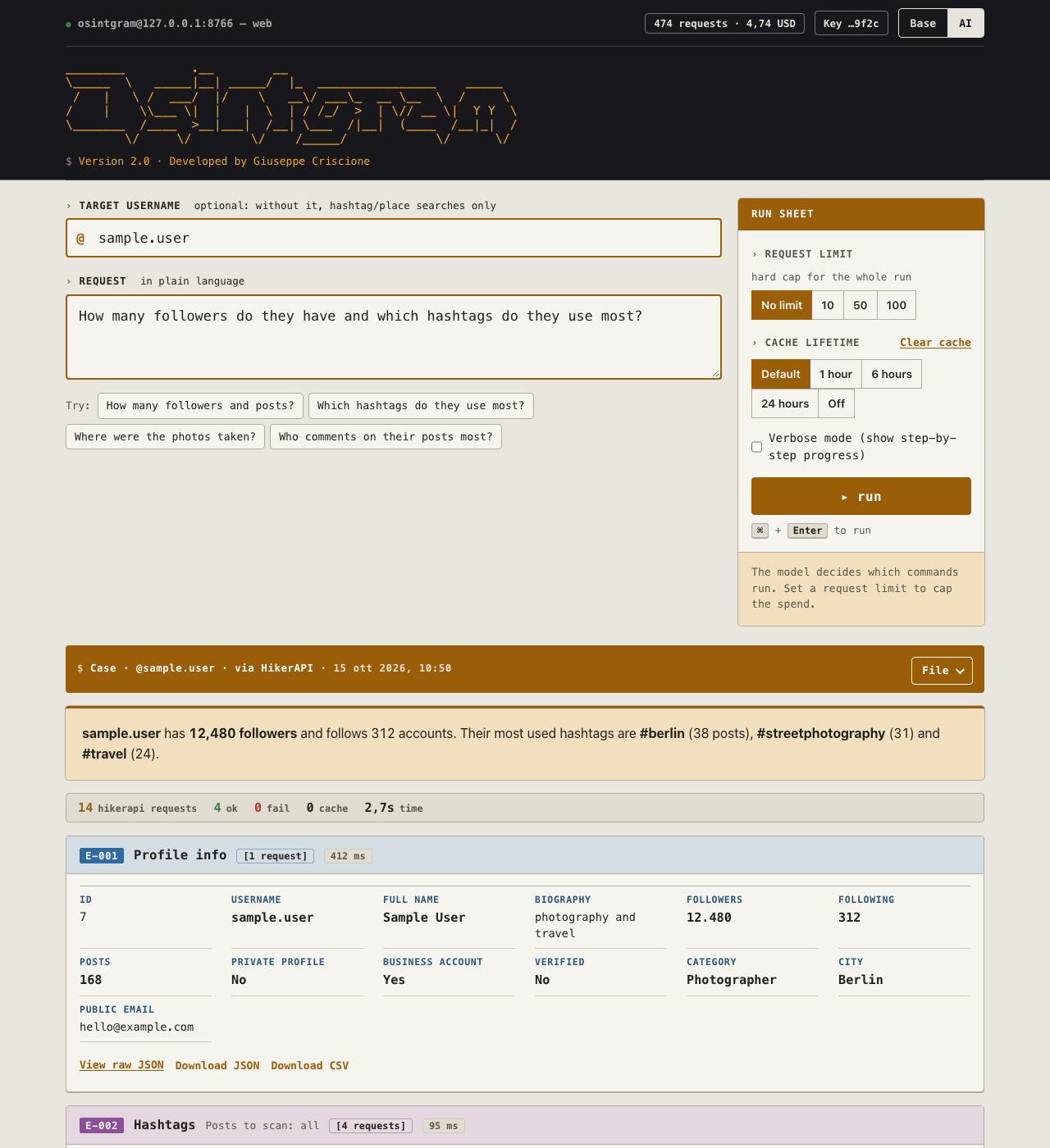
Point it at an Instagram account and find out who's behind it. Osintgram collects, cross-references and lays out everything a public profile gives away — followers, captions, hashtags, geotagged locations, posting habits, public contact details — in a web interface you run on your own machine.
Ask in plain language and a local AI model figures out which lookups to run. Or don't: pick the commands yourself and skip the model entirely.
Why you might like it
It answers questions, not just commands. "How many followers do they have and which hashtags do they use most?" runs three lookups and comes back with a written answer — and the raw results underneath, so you can check the work instead of trusting the prose.
Nothing leaves your machine except the lookups themselves. The AI runs
locally through Ollama: no OpenAI key, no subscription, no
prompt of yours sent to anyone. The interface is served from 127.0.0.1.
It tells you what a search will cost before you run it. Instagram data isn't free, and most tools let you find out the expensive way. This one prices your selection up front, shows your remaining credit, caches every request so you never pay twice for the same lookup, and lets you cap or stop a run — server-side, not just in the browser.
It shows you what it found, properly. Post thumbnails in a filterable grid, geotagged locations on a map, a weekday × hour heatmap of when someone posts, comparison between two accounts. Not a wall of JSON — though the JSON is one click away on every card.
You can hand the result to someone else. One button turns a finished search into a standalone HTML report that opens in any browser, with no server and no Osintgram.
Two ways to drive it
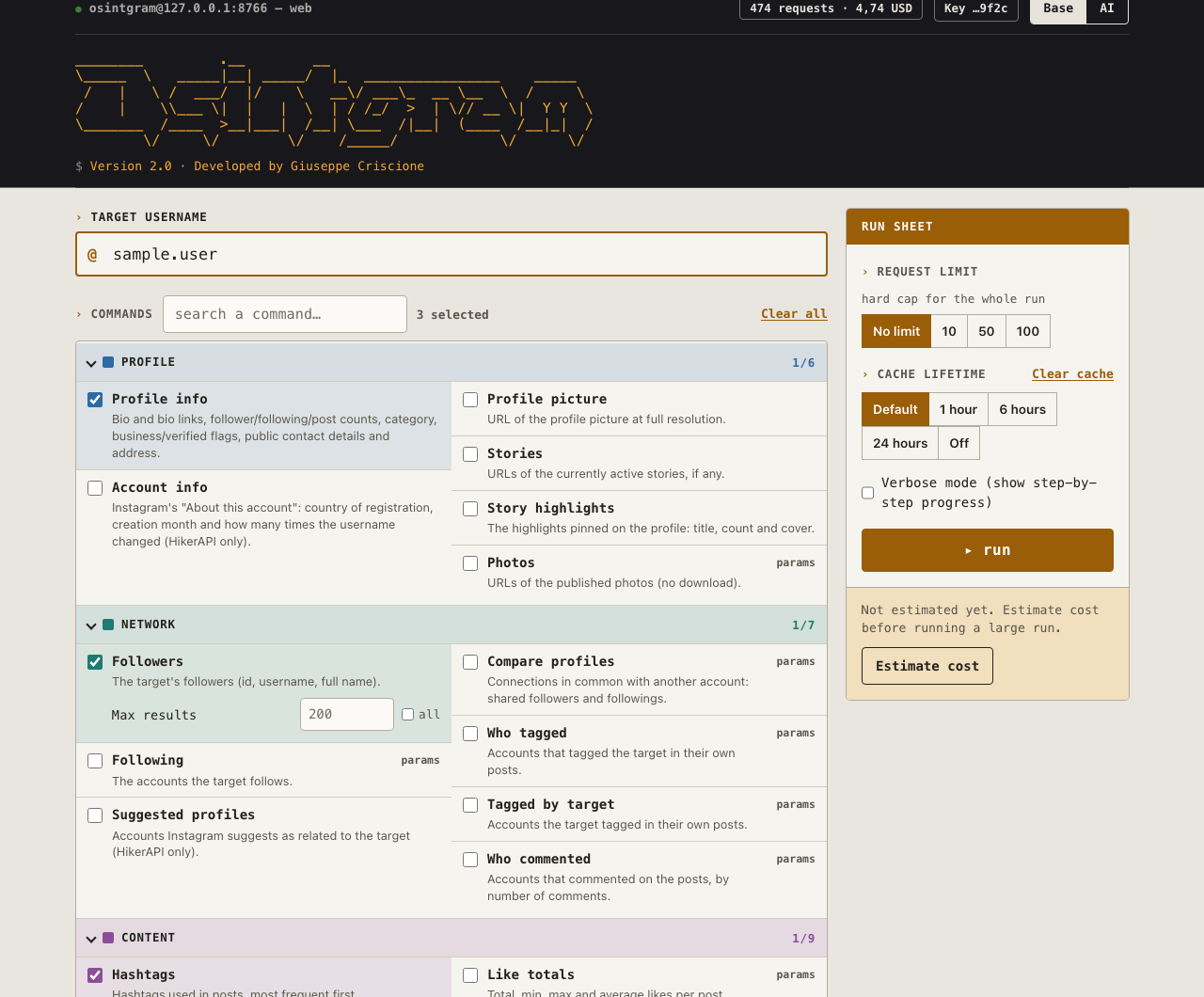
AI mode — describe what you want. A local model picks the commands, runs them and summarizes. It can only choose from the same list below; it can't invent lookups or make up data.
Base mode — no model, no Ollama needed. All 29 commands, one line each, grouped and searchable. Tick what you want, set the parameters, run them in order.
You can also leave the username empty in AI mode and just ask about a hashtag or a place — those searches belong to no account.
What you can find out
| Profile | Bio and every link in it, follower/following/post counts, category, public email, phone and business address down to the coordinates, linked Facebook id — plus Instagram's own About this account: country of registration, creation date, how many times the username changed |
| Network | Followers and followings, accounts Instagram suggests as related, who tagged them, who they tagged, who comments most — and mutual connections between two accounts |
| Content | Hashtags ranked by use, captions, every comment, like and comment statistics, photo/video/carousel breakdown with views and paid partnerships, posting-times heatmap, geotagged locations on a map, photo alt text |
| Contacts | Public emails and phone numbers among a target's followers or followings |
| No target needed | Posts published with a hashtag (top or recent) or from a place, and who published them — plus every comment on one specific post or reel, given its URL, shortcode or id |
Stories, highlights and profile pictures come back as direct CDN links — and any card with media in it offers a one-click zip of the originals.
Quick start
pip install -r requirements.txt
uvicorn src.web.app:app --host 127.0.0.1 --port 8000 --reload   # or: make run
Open http://127.0.0.1:8000.
You need a data backend. The page opens on a panel where you can paste a HikerAPI key directly — it's verified before it's accepted, and can be saved for next time. (A free instagrapi login works too, using an Instagram account of your own — see the guide for the trade-offs.)
For AI mode, install Ollama and pull a tool-calling capable model:
ollama pull llama3.1:8b # ~4.7 GB, the default
Base mode works without it.
Prefer containers?
docker compose up --build # or: make docker
Same address, same behaviour — published on 127.0.0.1 only. Your key, cache
and saved searches stay on the host in config/, cache/ and dossier/,
never inside the image. AI mode reaches an Ollama running on your host.
$${\color{red}Warning:}$$ This runs on
127.0.0.1with no authentication. It's built to run on your own machine — don't expose it beyond localhost without putting an auth layer in front of it first.
📖 Read the full guide → doc/web-ui.md
Setup for both backends, every command with its parameters and cost, how to keep spending down, exporting and sharing results, all configuration options, and troubleshooting.
Before you use it
FOR EDUCATIONAL PURPOSE ONLY. The contributors do not assume any responsibility for the use of this tool.
- Don't use your own or primary Instagram account with it.
- Never commit
config/credentials.ini— API keys and Instagram credentials live there. It's git-ignored; keep it that way. If a key has ever been pushed, rotate it: deleting the file doesn't remove it from history. - Results contain other people's personal data. Handle them in line with data-protection law (GDPR and equivalents) and Instagram's Terms of Use.
- You cannot see private profiles. Nothing can. Tools claiming otherwise are scams.
Development
pip install -r requirements-dev.txt
python -m pytest
The test suite runs entirely against synthetic fixtures — no API key, no quota, no network. It also checks that the documentation hasn't drifted away from the code.
Feature requests and pull requests are welcome — open an issue. Found a security problem? Please report it privately instead: see SECURITY.md.
Credits
Osintgram is written by Giuseppe Criscione (Datalux). Version 2.0 rebuilds it around a web interface and a reusable service layer, and adds the AI mode, the cost controls and the newer analyses — see the changelog.
It owes a great deal to everyone who has contributed since the first release:
Instagram data comes from HikerAPI or instagrapi. Geocoding by Nominatim / OpenStreetMap. Maps by Leaflet. Local models via Ollama.
Released under the GPL-3.0 licence.
Instagram is a trademark of Meta Platforms, Inc. This project is not affiliated with, endorsed by, or approved by Meta.
Ähnliche Projekte entdecken
codecrafters-io/build-your-own-x
Meistere das Programmieren, indem du deine Lieblingstechnologien von Grund auf neu erschaffst.
561,398 Sternepublic-apis/public-apis
Eine gemeinschaftliche Liste kostenloser APIs
497,679 Sternemorluto/rea
Mit Agenten alles per Reverse Engineering untersuchen, vom Verhalten der Anwendung bis hin zu nativen Binärdateien.
447,495 Sterneopenclaw/openclaw
Die KI, die wirklich Dinge erledigt. Jedes Betriebssystem, jede Plattform. Auf die Hummer-Art. 🦞
394,261 Sterne