
Cedro-Software/cedro-modern-dock
Über uns
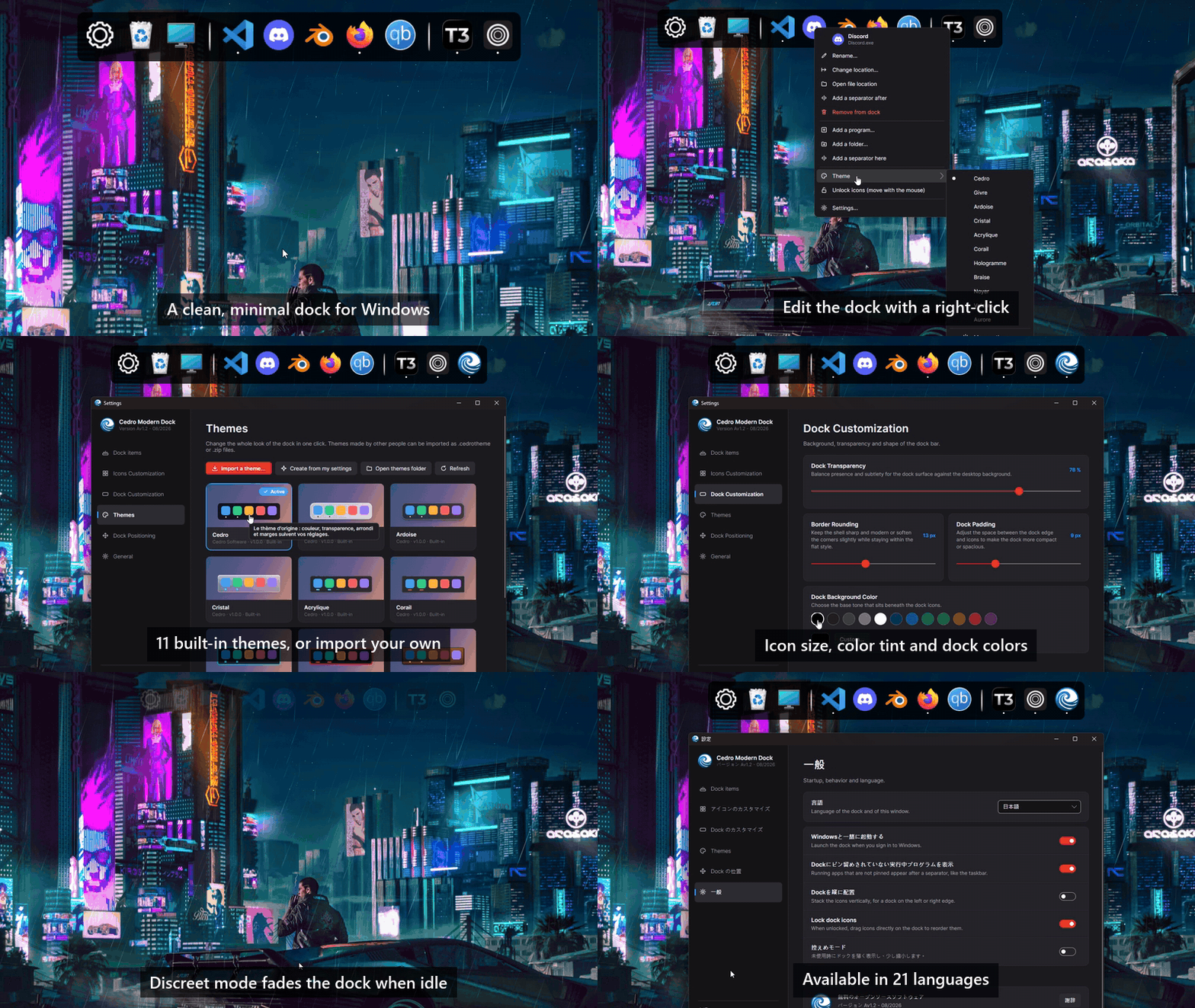
Cedro Modern Dock is a free and open-source alternative to Winstep Nexus Dock, RocketDock and other Dock software. Quick access to your favorite apps on WIndows with customization.
EntwicklerwerkzeugeGemessener Sternzuwachs
- in 24h
- 0
- in 7 days
- +2
- in 15 days
- Verlauf wird gesammelt
- in 1 month
- Verlauf wird gesammelt
Nettoänderungen in überlappenden Zeiträumen, keine Tagessummen. Fehlende Messwerte bleiben leer. Sterne zeigen Interesse, nicht Qualität.
README.md
Original





Follow @TeiuAlligator on X to stay tuned for new features and updates!
How To Install
- Go to Releases:
- Download the latest
CedroModernDock-1.2.0-x64.msifile- Execute and install
Special Thanks 💖

|
Free code signing provided by SignPath.io, certificate by SignPath Foundation. |
What's new in v1.2
- Live window previews: Hover a running app to see its open windows in real time, click one to bring it forward.
- Running apps you haven't pinned: Apps currently open but not pinned show up on the dock now.
- Customize your icons: iOS-style color tint with 12 presets or pick your own color.
- Drag to reorder: Now you can rearrange your dock shortcuts right in the Settings list by dragging them around.
- Vertical dock: Arrange the dock vertically on either side of the screen.
- Updates that keep your setup: - Upgrading to a new version replaces the app but keeps your shortcuts and settings.
- Long-awaited feature: Now CTRL + D does NOT minimizes the Dock anymore. It remains on the Desktop.
Supported Languages
- 🇺🇸 English
- 🇧🇷 Portuguese (Brazil)
- 🇪🇸 Spanish
- 🇫🇷 French
- 🇩🇪 German
- 🇯🇵 Japanese
- 🇨🇳 Chinese (Simplified)
- 🇹🇼 Chinese (Traditional)
- 🇮🇳 Hindi
- 🇸🇦 Arabic
- 🇧🇩 Bengali
- 🇷🇺 Russian
- 🇵🇰 Urdu
- 🇮🇩 Indonesian
- 🇳🇬 Nigerian Pidgin
- 🇮🇳 Marathi
- 🇮🇳 Telugu
- 🇹🇷 Turkish
- 🇮🇳 Tamil
- 🇭🇰 Cantonese
- 🇻🇳 Vietnamese
Built With

How To Contribute
Only for those who wish to contribute in the project's coding, none of this is required for you to do if you just want to download it
Understand the project architecture:
The project follows a layered architecture:
CedroModernDock.Core: Domain models, Application services, and i18n (portable, no OS deps)CedroModernDock.Infrastructure.Windows: Windows-specific adapters (Win32 interop, icon extraction, JSON persistence, registry auto-start, tray icon)CedroModernDock: Avalonia UI (dock view, settings window, view models, view locators)CedroModernDock.Tests: xUnit test suite
App.axaml.cs is responsible for composing these dependencies and injecting them into the view models.
Prerequisites
Before you begin, ensure you have the following installed on your system: (required only for development)
- An IDE (Visual Studio 2022 or Rider recommended).
- .NET 9 SDK (or .NET 10 SDK).
- Git for cloning the repository.
How To Run Locally
- Clone the repository
- Before running, make sure to install all the dependencies (
dotnet restore) - Run
dotnet run --project src/CedroModernDockto run the program - Make desired changes
- Commit your changes
- Open a pull request
How To COMPILE Locally
- Clone the repository
- Install all dependencies (
dotnet restore) - Run
dotnet build src/CedroModernDock -c Releaseon the terminal - The
.exefile will be available atsrc/CedroModernDock/bin/Release/net9.0-windows/CedroModernDock.exe
Ähnliche Projekte entdecken
Wird geladen…