
2giosangmitom/sqmeow.nvim
2giosangmitom/sqmeow.nvim has 171 GitHub stars and 6 forks. Star changes are not measured yet. Last checked 2026-11-14 13:56 UTC. Last push 2026-11-12.
What you can do
- Multiple databases: Work with SQL, NoSQL, and analytical databases in one place.
- Interactive results: Browse, filter, sort, and edit data directly in Neovim.
- Query history: Revisit previous results without running queries again.
- Local result processing: Filter and sort retained rows using Polars.
Gemessener Sternzuwachs
- in 24h
- Verlauf wird gesammelt
- in 7 days
- Verlauf wird gesammelt
- in 15 days
- Verlauf wird gesammelt
- in 1 month
- Verlauf wird gesammelt
Nettoänderungen in überlappenden Zeiträumen, keine Tagessummen. Fehlende Messwerte bleiben leer. Sterne zeigen Interesse, nicht Qualität.
Über uns
Modern SQL and NoSQL database client for Neovim
DatenREADME.md
Originalsqmeow.nvim

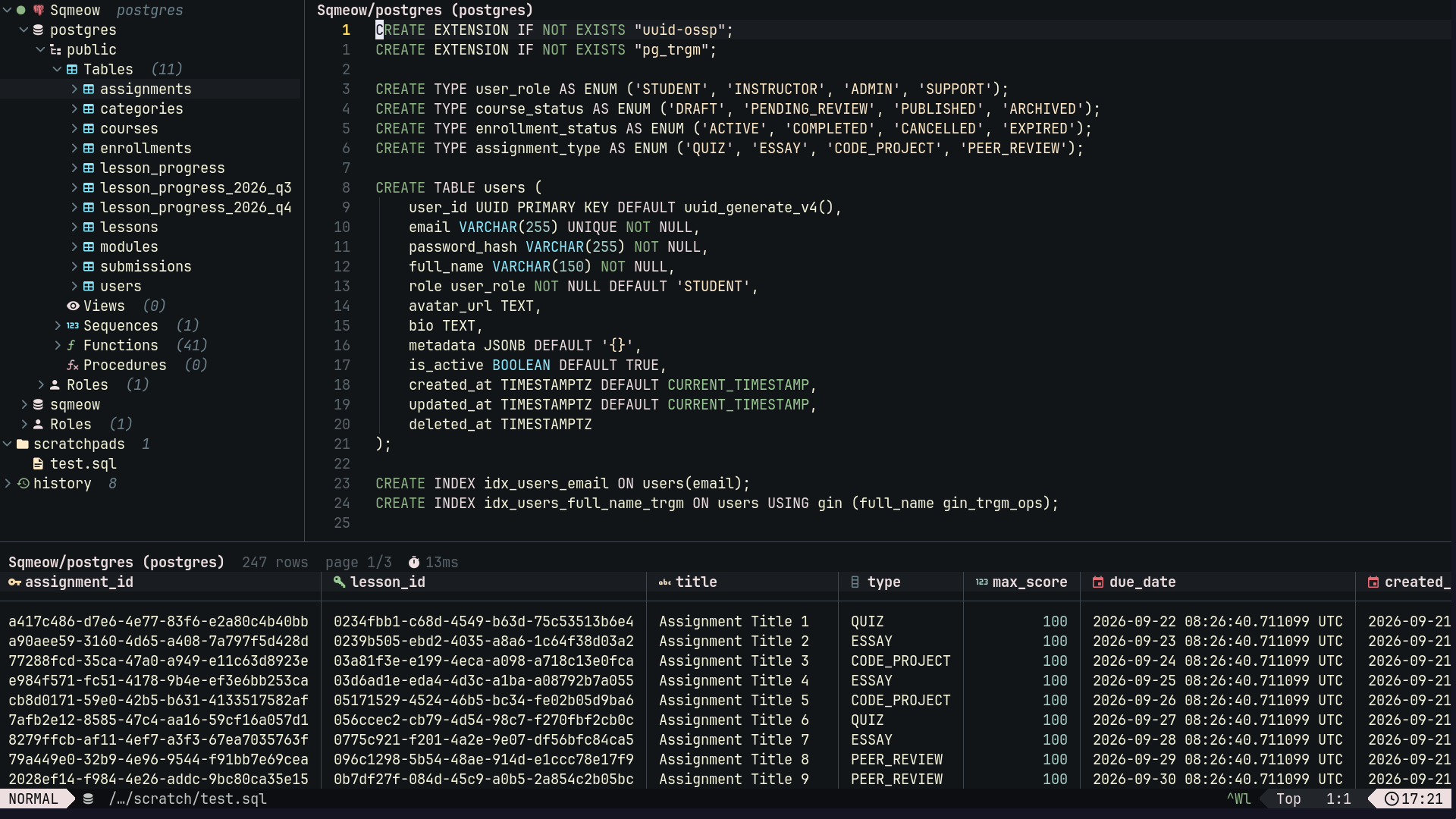
A lightweight database client that lives inside Neovim. Browse databases, run queries, edit data, and explore results without leaving your editor.
If you spend most of your time in the terminal and don't want to switch to a GUI just to inspect a few rows, sqmeow.nvim is for you.

Preview
Screenshots
Overview
Editing results
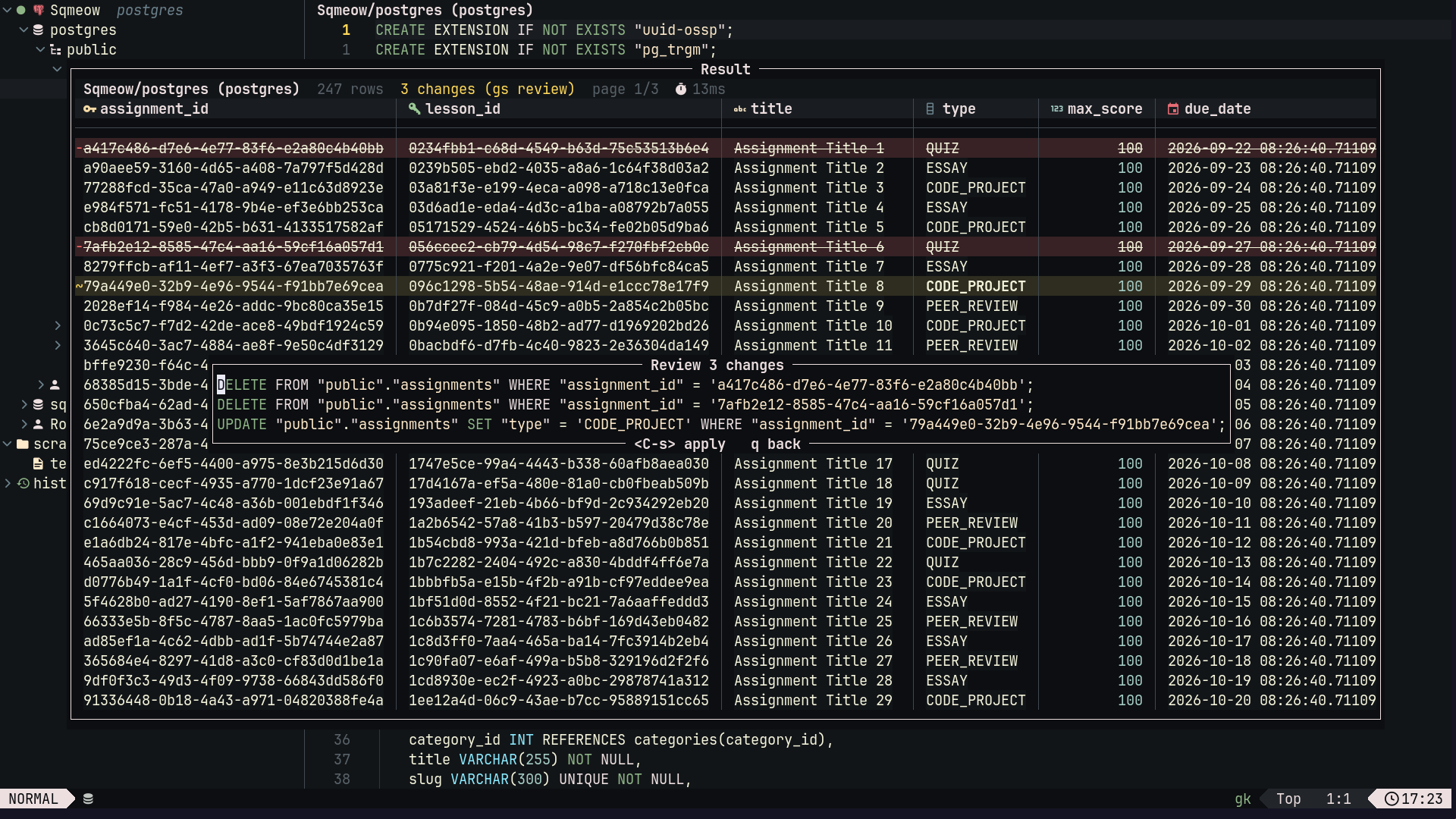
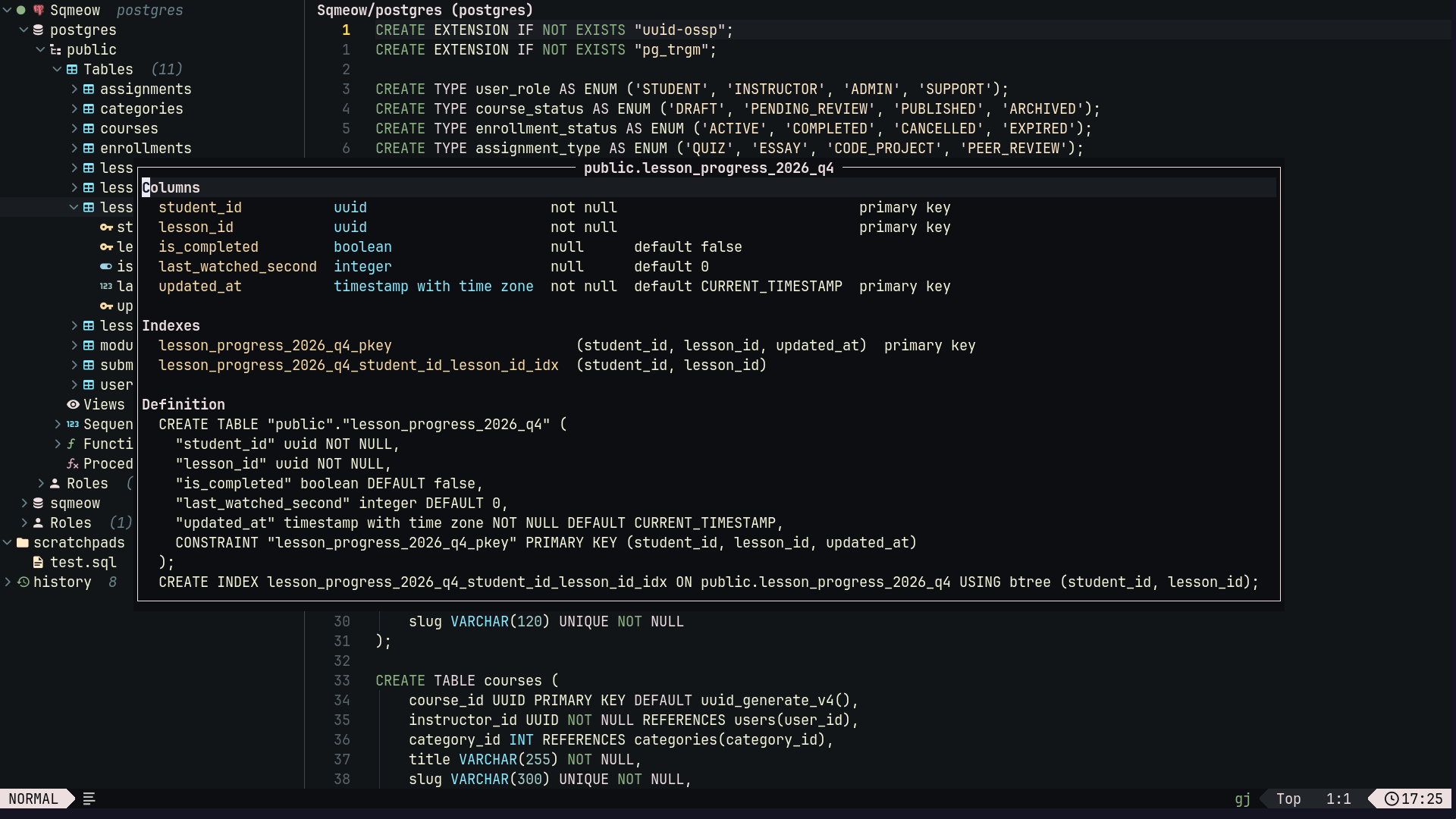
Table structure
Features
- Multiple databases: Work with SQL, NoSQL, and analytical databases in one place.
- Interactive results: Browse, filter, sort, and edit data directly in Neovim.
- Query history: Revisit previous results without running queries again.
- Local result processing: Filter and sort retained rows using Polars.
- Project-local connections: Keep connections and scratchpads alongside your project.
- Completion: Database-aware suggestions with blink.cmp or nvim-cmp.
- Rust engine: Database operations run in a separate Rust process.
Supported databases
- Relational & analytical: PostgreSQL, CockroachDB, MySQL, MariaDB, SQLite, DuckDB, ClickHouse, Oracle Database, Microsoft SQL Server.
- Key-value & document: Redis, Valkey, Dragonfly, MongoDB, SurrealDB.
- Wide-column: ScyllaDB, Cassandra.
Installation
Requires Neovim 0.10+ and nui.nvim. nvim-treesitter is optional and enables query-aware autocomplete.
Calling setup() is optional unless you want to customize the defaults.
lazy.nvim
{
  "2giosangmitom/sqmeow.nvim",
  version = "*",
  dependencies = { "MunifTanjim/nui.nvim" },
  build = function()
    require("sqmeow").install()
  end,
  opts = {},
  cmd = "Sqmeow",
}
vim.pack (Neovim 0.12+)
Register the handler before vim.pack.add():
vim.api.nvim_create_autocmd("PackChanged", {
  callback = function(event)
    local data = event.data
    if data.spec.name ~= "sqmeow.nvim" or (data.kind ~= "install" and data.kind ~= "update") then
      return
    end

    vim.schedule(function()
      require("sqmeow").install()
    end)
  end,
})

vim.pack.add({
  "https://github.com/MunifTanjim/nui.nvim",
  {
    src = "https://github.com/2giosangmitom/sqmeow.nvim",
    version = vim.version.range(">=0.0.0"),
  },
})
Run :packupdate to update your plugins.
The install hook downloads the matching engine release. Prebuilt binaries are available for Linux (x86_64/ARM64), macOS (Apple Silicon), and Windows (x86_64).
Building from source requires Rust, SQLite, and DuckDB. See CONTRIBUTING.md for build instructions.
To track master with lazy.nvim or vim.pack, remove the release version setting and use install("cargo").
After installation, run :checkhealth sqmeow to verify your setup. Use :Sqmeow restart after rebuilding the engine.
Getting started
- Run
:Sqmeowto open the drawer and results window. - Press
Ain the drawer to add a database connection. - Press
<CR>to connect, thenuto select it for queries. - Press
ato create a scratchpad, write a query, and press<CR>to execute it.
Use visual <CR> to execute selected text, or <leader>E to execute the entire buffer.
Press ? in the drawer or results window to see available keymaps.
Keymaps
| Key | Action |
|---|---|
p / P |
Preview a table / also open its query |
gd / gr |
Query referenced parent row / referencing child rows |
gR |
Browse declared foreign keys for a table or column |
L / H |
Next / previous page |
K |
Show row details |
gf / go |
Open the filter / sort bar |
= |
Filter by the current cell |
s / S |
Sort by column / add another sort column |
i |
Stage a cell edit |
gs |
Review staged edits |
<C-s> |
Apply edits from the review window |
x |
Export results as CSV, JSON, or SQL (where supported) |
R |
Reset filters, sorting, and hidden columns |
Working with results
Editing
Edit cells directly in the result grid, review your changes, and apply them when ready.
Editing requires table-backed columns and a complete primary or unique key. Availability varies by database adapter. For server-enforced read-only access, use a read-only database account.
Filtering and sorting
sqmeow.nvim uses Polars SQL to filter and sort retained results locally, including results from query history.
You can explore data without rerunning the original query or losing staged edits. Rerun the query whenever you need fresh data.
Query languages
Each database uses its own query language:
- SQL databases use their respective SQL dialects.
- Redis accepts one command per line.
- MongoDB accepts Extended JSON commands.
- ScyllaDB and Cassandra use CQL.
- SurrealDB uses SurrealQL.
For more details, see :h sqmeow-commands, :h sqmeow-keymaps, and :h sqmeow-queries.
Connections
Add and save connections through the drawer, or define project-specific connections in .sqmeow/connections.toml:
[dev]
type = "postgres"
host = "localhost"
port = 5432
database = "my_app"
user = "dev_user"
password = "{{ env 'PGPASSWORD' }}"

[local]
type = "sqlite"
path = "app.db"
The nearest project configuration overrides saved connections with the same name. Relative database paths are resolved from the project root.
Credentials
You can also connect using a database URL:
[dev]
url = "{{ env 'DATABASE_URL' }}"
read_only = true
Set DATABASE_URL in your environment or in a .env file next to .sqmeow/. Environment variables take precedence over values in .env.
Keep .env out of version control, and reconnect after changing credentials.
SSH tunnels
To connect through SSH, set ssh = "user@bastion" or use a Host alias from ~/.ssh/config. The database host is resolved from the SSH host.
See :h sqmeow-project and :h sqmeow-credentials for all connection options.
Scratchpads
Store project queries in .sqmeow/scratchpads/ using .sql, .redis, .json, or .surql files.
Manage them directly from the drawer:
a: Create a file or folder.R: Rename or move.d: Delete.
Queries run against the currently selected connection.
Completion
Use blink.cmp or nvim-cmp for database-aware completion.
For query-aware suggestions, install the SQL Tree-sitter parser with :TSInstall sql via nvim-treesitter.
blink.cmp
require("blink.cmp").setup({
  sources = {
    default = { "lsp", "path", "buffer", "sqmeow" },
    providers = {
      sqmeow = {
        name = "Sqmeow",
        module = "sqmeow.completion.blink",
      },
    },
  },
})
nvim-cmp
local cmp = require("cmp")
cmp.register_source("sqmeow", require("sqmeow.completion.cmp").new())

cmp.setup({
  sources = cmp.config.sources({
    { name = "nvim_lsp" },
    { name = "sqmeow" },
  }),
})
See :h sqmeow-completion for more details.
Statusline
Sqmeow exposes the current buffer's state as a plain table, so you can render connection and query telemetry in any statusline: lualine.nvim, heirline, mini.statusline, or a custom 'statusline'.
require("sqmeow.api.view").status() returns nil outside database buffers, and require("sqmeow.api.view").column() returns the active result column and SQL type, or "".
If you display connection and query telemetry in your global statusline, you can disable winbars completely (ui = { winbar = false }) or control them per window (ui = { winbar = { editor = false, result = true, show_connection = false } }).
lualine.nvim

require("sqmeow").setup({
ui = {
-- Hide winbars when showing connection and result telemetry in lualine:
winbar = false,
-- Or configure editor and result winbars independently:
-- winbar = { editor = false, result = true, show_connection = false },
},
})
local view = require("sqmeow.api.view")
local function query()
local info = view.status()
if not info then
return ""
end
local parts = { info.connection or info.role }
if info.read_only then
parts[#parts + 1] = ""
end
if info.state == "executing" then
parts[#parts + 1] = "running…"
elseif info.state == "error" then
parts[#parts + 1] = info.error and ("error: " .. info.error) or "error"
elseif info.state == "cancelled" then
parts[#parts + 1] = "cancelled"
elseif info.state == "done" then
if info.view_rows then
parts[#parts + 1] = ("%d/%d rows"):format(info.view_rows, info.rows or 0)
elseif info.rows then
parts[#parts + 1] = ("%d rows"):format(info.rows)
elseif info.affected then
parts[#parts + 1] = ("%d affected"):format(info.affected)
end
if info.elapsed then
parts[#parts + 1] = info.elapsed
end
if info.total_pages and info.total_pages > 1 then
parts[#parts + 1] = ("p%d/%d"):format(info.page or 1, info.total_pages)
end
if info.filtered then
parts[#parts + 1] = "filtered"
end
end
if info.staged_changes > 0 then
parts[#parts + 1] = "●"
end
return table.concat(parts, " · ")
end
require("lualine").setup({
sections = {
lualine_x = {
-- Active column name and SQL type when focused inside the result grid (e.g. ` user_id (int4)`)
{
view.column,
cond = function()
return view.column() ~= ""
end,
},
},
lualine_y = {
-- Active connection and query telemetry (e.g. `dev · 142 rows · 12ms`)
{
query,
cond = function()
return view.status() ~= nil
end,
},
},
},
})
What status() returns
local info = require("sqmeow.api.view").status()
-- info = {
--   connection = "dev",
--   dialect = "postgres",
--   database = nil,
--   read_only = false,
--   role = "query",          -- "query" | "result" | "drawer" | "preview" | "alter" | "routine"
--   state = "done",          -- "executing" | "done" | "error" | "cancelled"
--   rows = 142,
--   view_rows = nil,         -- set when filtered
--   affected = nil,          -- set for UPDATE / DELETE / INSERT
--   truncated = false,
--   elapsed_ms = 12,
--   elapsed = "12ms",
--   page = 1,
--   total_pages = 2,
--   filtered = false,
--   staged_changes = 0,
--   error = nil,             -- set when state is "error"
--   column = { index = 1, total = 6, name = "id", type_name = "int4", class = "number" },
-- }
status() returns nil outside database buffers. staged_changes counts edits across all open results, column is set only in the result grid, and state/row counts describe the call whose connection matches the buffer.
See :h sqmeow.api.view.status() and :h sqmeow.api.view.column() for more details.
Configuration
You can customize behavior with setup().
Common options with their defaults:
require("sqmeow").setup({
  ui = {
    drawer = { position = "left", width = 36 },
    result = { height = 16, page_size = 100, max_column_width = 48 },
    persist_session = false,
  },
  query = {
    max_rows = 100000,
    timeout_ms = 0,
    persist_history = true,
    confirm_destructive = true,
  },
  redact_urls = true,
})
max_rows limits the number of retained rows, while page_size controls how many rows appear per page.
Set max_rows = 0 for unlimited rows or timeout_ms = 0 to disable query deadlines.
See :h sqmeow-config for all configuration options and :h sqmeow-keymaps for custom keymaps.
Acknowledgments
Thanks to these projects for ideas and workflows:
I've borrowed plenty of ideas and even some code here and there. That's the beauty of open source! :)
Contributing
Contributions welcome. Open an issue, report a bug, suggest a feature, or submit a pull request.
See CONTRIBUTING.md for development setup and guidelines.
Thanks to everyone who has contributed to sqmeow.nvim! 💛