
1lck/viff has 107 GitHub stars and 14 forks. Star changes are not measured yet. Last checked 2026-11-14 01:47 UTC. Last push 2026-11-13.
Gemessener Sternzuwachs
- in 24h
- Verlauf wird gesammelt
- in 7 days
- Verlauf wird gesammelt
- in 15 days
- Verlauf wird gesammelt
- in 1 month
- Verlauf wird gesammelt
Nettoänderungen in überlappenden Zeiträumen, keine Tagessummen. Fehlende Messwerte bleiben leer. Sterne zeigen Interesse, nicht Qualität.
Über uns
A lightweight native Git desktop client built with Go and Viva. No Electron, no WebView.
EntwicklerwerkzeugeREADME.md
Original
Viff
A lightweight, native Git and Subversion desktop client, with a project browser and in-app editing of working-tree text files, an English/Chinese interface, and optional AI-written commit messages.
Go + Viva. No Electron. No WebView. No bundled browser.


Features · Community · Contribute · Releases
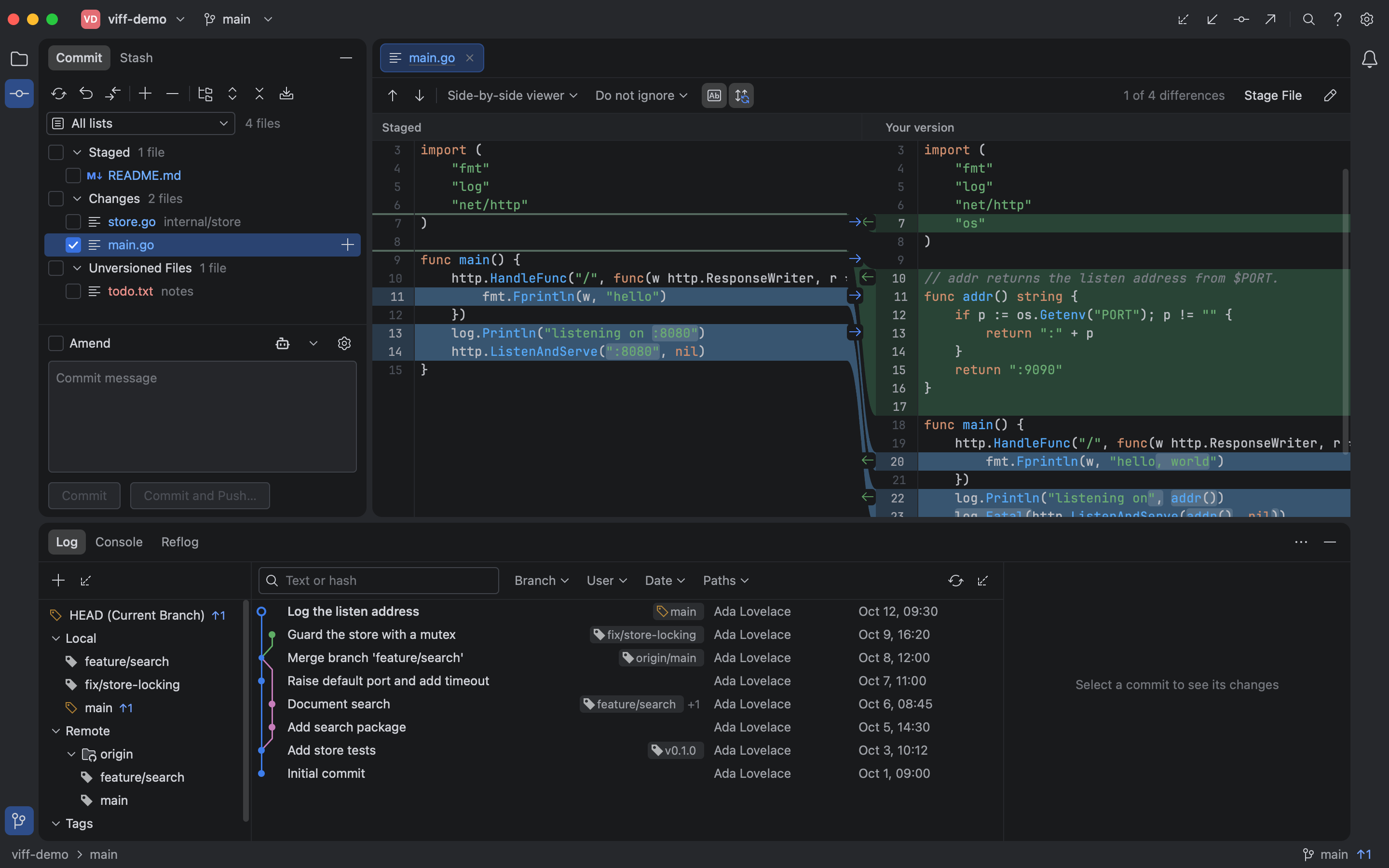
Keep the tool lightweight. Keep the workflow complete.
Git stays the core. Around it, Viff adds a project browser with Quick Open and in-app editing of working-tree text files, picture diffs, an English/Chinese interface, and optional model-written commit messages. It is written in Go with Viva, renders without a browser engine, and runs your installed Git executable.
- A small distribution: one application executable, plus license files. No separate browser runtime or local server to install.
- A native desktop foundation: Viva handles rendering and platform integration; Viff does not ship an Electron or WebView application.
- Git stays Git: use your repositories, remotes, hooks, and configured credentials. Inspect executed commands and output in the Console.
- Work is loaded as needed: paginated history and on-demand diffs keep large repositories from becoming a single eager load.
For a concrete size reference, the stripped executables inside the v0.2.0
packages on November 5, 2026 were 12.13 MiB on macOS arm64 and 13.67 MiB
on Windows amd64 (-trimpath -ldflags="-s -w", executable only). Archive
size, installed Git, and runtime memory are separate measurements.
Lightweight is a design goal, not an unmeasured performance claim. Memory usage and startup time vary with the repository, platform, and renderer; no comparative RAM or startup benchmark is claimed.
Join the community
Welcome to join the Viff community — share your experience, ask questions, and follow the latest updates.
Scan with WeChat to join the group. The group QR code expires periodically; if it no longer works, open an issue and we will refresh it.
A full Git workflow
| Work | What Viff provides |
|---|---|
| Review changes | Side-by-side diffs with resizable panes and collapsible unchanged stretches, unified diffs, syntax and word highlighting, search, synchronized scrolling, tabs, picture previews, change marks on the right edge |
| Build a commit | Check files, folders, or groups to commit exactly those files from the working tree, or stage files, hunks, or lines and commit the index; roll back, amend, sign off, and commit/push; fold the editor or write the message with a model |
| Organize work | Multiple repositories with per-repository commit drafts, a Project panel that groups the workspace and switches the active repository, directory grouping, named ChangeLists, and discovery of repositories below a parent folder |
| Read history | Commit graph, branch/author/path filters, multi-commit changed-file views, blame, reflog, and revision tree browsing |
| Browse and edit files | Project tool window with folders, status colours, Quick Open, read-only viewing with an optional code map, blame, file history, and editing of working-tree UTF-8 text files (up to 1 MiB, saved text included) |
| Manage branches | Checkout, merge, rebase, cherry-pick, revert, reset, and stash-assisted checkout |
| Undo mistakes | Command-Z reverses the last local commit, merge, rebase, checkout, or branch change from this session |
| Resolve conflicts | Ours / Result / Theirs views with an editable Result pane, per-block Ours/Theirs/Both applied to that buffer, stale-checked Save, explicit mark-as-resolved, and a copyable context for an external AI tool |
| Work across checkouts | Create worktrees from new or existing branches; manage submodules with dirty-work protection |
| Track large files | Detect Git LFS rules and missing git-lfs; count and list managed files on demand from the LFS marker or Git tool window menu |
| Exchange changes | Fetch, pull, push, force-with-lease, remotes, patches, and signing/credential settings |
| Work on the web | Open commits, branches, comparisons, and the pull request form on GitHub, GitLab, Bitbucket, or Gitea |
| Run commands | Integrated terminal in the current repository: scrollback, selection copy, paste, clear, restart, and resize |
| Open WSL repositories | On Windows, open a repository inside a WSL distribution: Git runs in the distribution, files are read through \\wsl.localhost |
| Observe SSH repositories | Open a working tree on a Linux/macOS server as ssh://host/path in read-only mode: status, history, diffs, refs and files come from the server's Git; nothing is written |
| Work in your language | English and Simplified Chinese interface, English by default, switchable in Settings |
In Log → Branch, type to search local branches, remote branches, and tags. Use ↑/↓ and Enter to apply a filter, or Esc to cancel.
The interface is English by default; switch it to Simplified Chinese in Settings → General → Language.
ChangeLists group files; they do not create separate Git indexes. Checking files makes them the commit scope: Commit and Commit and Push… record exactly the checked files from the working tree — modifications, new or untracked files, and deletions — without staging them first. Unchecked staged files stay staged and out of that commit. With nothing checked the old default is unchanged: the commit includes all staged files, even when a list filter is active, and filtered bulk staging only stages visible files. Checking never stages; Stage Selected remains for fine-grained staging. When a checked file has both staged and unstaged changes the panel says that the working-tree version will be committed and asks first; a merge or cherry-pick in progress can only commit the whole index, so it asks you to uncheck the files or finish the operation.
AI commit messages are optional and off by default. When enabled, the changed files and their diffs are sent to the endpoint you configure, together with the commit message rules you wrote or the built-in ones; see the privacy guide.
The conflict viewer edits the merged result in place. The middle Result pane
takes typing and per-block Ours/Theirs/Both choices; Save Merge Result (⌘S)
re-reads the file and refuses an external change, and Mark as Resolved stays an
explicit step. Binary, oversized, submodule, symlink, unreliable-marker and
Subversion/remote conflicts stay read-only.
Copy for AI puts the conflict context on your clipboard. It is for whatever external tool you choose; Viff calls no model and sends nothing.
Content search builds no index. Find in Files reads the working tree on every query, so a broad search in a large repository can take seconds; results stop at 300 and ask you to narrow the query.
ripgrep is optional and not bundled. The default auto setting uses it when
it is installed and falls back to Git grep otherwise.
Light theme
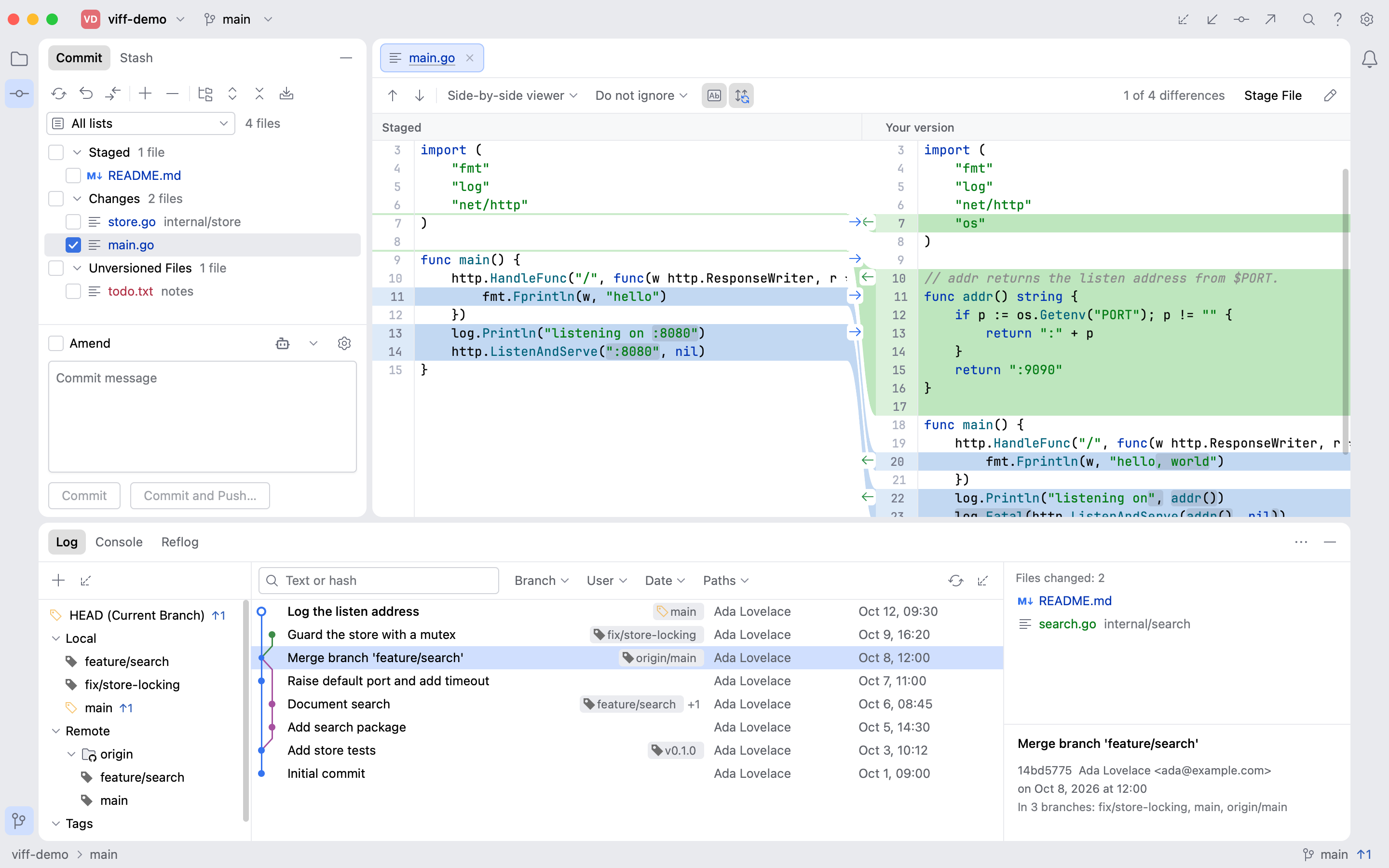
Screenshots come from real Viva headless tests using disposable demo repositories.
Supported version control systems
Viff serves both Git and Subversion repositories from the same window. Entry points that a backend cannot support are hidden rather than shown and failing; the reasoning is recorded in 0025.
| Capability | Git | Subversion |
|---|---|---|
| Checkout/open, status, diff, blame, file contents | Yes | Yes |
| History | Yes (commit graph) | Yes (linear, backed by a local cache) |
| update / commit / revert / add / delete | Yes | Yes (partial commits via a target set) |
| Branch switching, creation, deletion | Yes | Yes (directories plus switch) |
| Conflict display and in-app result editing | Yes | Display only |
Property editing (svn:ignore, svn:eol-style) |
Not applicable | Not implemented yet |
| lock / unlock | Not applicable | Not implemented yet |
| rebase, cherry-pick, reset, interactive rebase | Yes | Not applicable |
| stash | Yes | Not applicable |
| worktree, reflog, submodule | Yes | Not applicable |
| Staging area (partial staging) | Yes | Not applicable |
Subversion differs in three ways that matter day to day:
- History needs the repository. The working copy holds no history, so Viff queries the repository and keeps the answer for the session. When the repository cannot be reached the failure is reported rather than passed off as current data; labelling a kept answer as stale is not implemented yet, so nothing is shown as if it were live.
- No staging area. Instead of staging, a commit takes an explicit set of target files, which you choose in the commit area.
- Commits are remote and atomic. Nothing is committed locally, and an interrupted commit must be re-checked rather than retried; a finished commit cannot be undone locally.
If macOS says it cannot open Viff.app
If macOS says that Apple cannot verify whether Viff.app contains malware, the
manually downloaded package may not yet be notarized by Apple. First confirm that
the app came from the trusted GitHub Releases,
then use one of these methods:
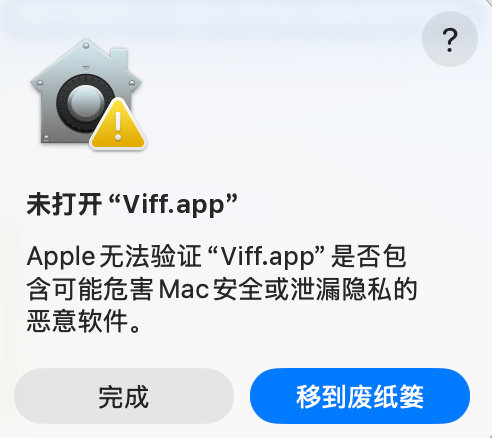
In Applications, Control-click
Viff.app, choose Open, and choose Open again in the confirmation dialog.If macOS still blocks it, open System Settings > Privacy & Security, click Open Anyway next to the security warning, and launch the app again.
You can also remove the quarantine attribute in Terminal:
sudo xattr -dr com.apple.quarantine /Applications/Viff.app
Only use these steps for an app whose source you trust.
⭐ Special thanks

For all things AI, head to LINUX DO. Wishing the community ever greater success.
Contributors
Thank you to everyone who contributes to and improves Viff.

License and credits
Viff's original code is MIT licensed. Viva, JetBrains Mono, IntelliJ Platform icons, and other dependencies retain their own licenses; see third-party notices.
The interface takes inspiration from IntelliJ IDEA's Git workflow. Viff is an independent project and is not affiliated with or endorsed by JetBrains.
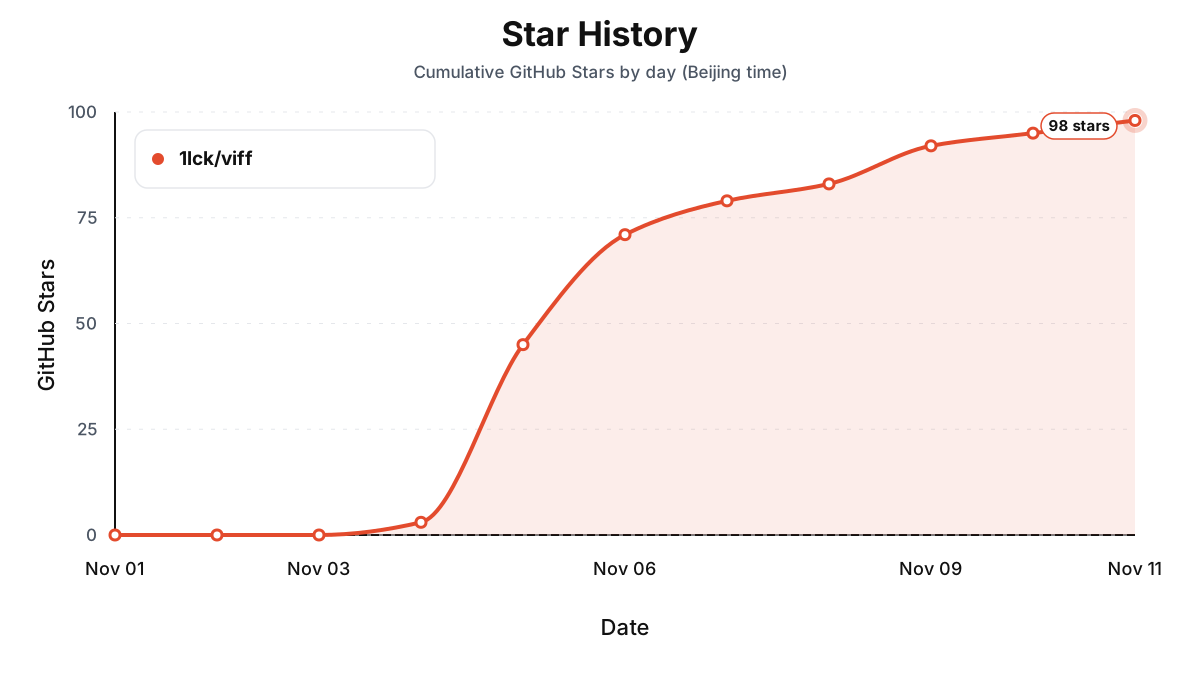
Star History
Ähnliche Projekte entdecken
codecrafters-io/build-your-own-x
Meistere das Programmieren, indem du deine Lieblingstechnologien von Grund auf neu erschaffst.
562,354 Sternepublic-apis/public-apis
Eine gemeinschaftliche Liste kostenloser APIs
498,800 Sternemorluto/rea
Mit Agenten alles per Reverse Engineering untersuchen, vom Verhalten der Anwendung bis hin zu nativen Binärdateien.
457,759 Sterneopenclaw/openclaw
Die KI, die wirklich Dinge erledigt. Jedes Betriebssystem, jede Plattform. Auf die Hummer-Art. 🦞
394,399 Sterne