
0xErwin1/dbflux
0xErwin1/dbflux has 522 GitHub stars and 41 forks. GitHot measured +3 stars in 24 hours. Last checked 2026-11-07 11:27 UTC. Last push 2026-11-04.
So werden diese Zahlen gemessen
A fast, keyboard-first database client built with Rust and GPUI.
Gemessener Sternzuwachs
- in 24h
- +3
- in 7 days
- Verlauf wird gesammelt
- in 15 days
- Verlauf wird gesammelt
- in 1 month
- Verlauf wird gesammelt
Nettoänderungen in überlappenden Zeiträumen, keine Tagessummen. Fehlende Messwerte bleiben leer. Sterne zeigen Interesse, nicht Qualität.
README.md
OriginalDBFlux
English · Español · 한국어 · 简体中文 · Português (Brasil)
An extensible, keyboard-first data platform delivered as a Rust + GPUI desktop client.
dbflux.dev · Documentation · Install
Overview
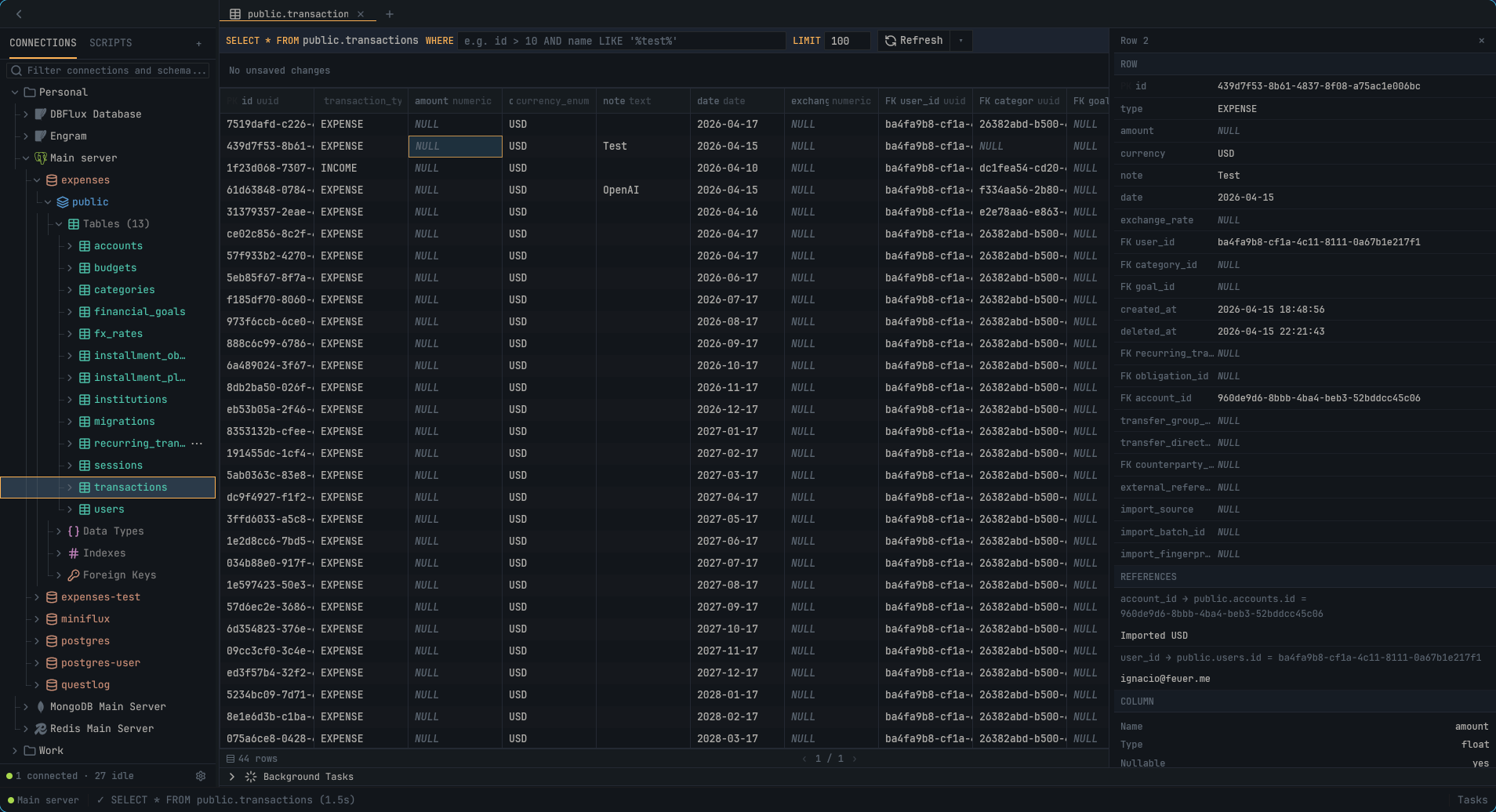
DBFlux is an open-source desktop client with built-in drivers for relational and non-relational databases. Its core contracts are driver-neutral, and external drivers can integrate over RPC.
The client focuses on performance, a clean UX, and keyboard-first workflows. The long-term goal is one fully open-source client for every database you work with.
Documentation
Everything below is published at docs.dbflux.dev, rendered from these same files, with search and a version selector. The links here point at the source; read them on the site if you prefer.
Choose the path that matches what you want to do.
Start here
| Goal | Guide |
|---|---|
| Create a connection | Start with Getting Started. For SSH tunnels, proxies, AWS SSO, and value sources, use Connecting — Advanced Setup. |
| Run queries and follow common workflows | Follow the Usage Guide for querying, browsing results, charting, exporting, and keyboard navigation. |
| View audit events | Open the audit viewer with the audit viewer guide. |
| Use MCP | Follow the AI + MCP Integration Guide. |
| Check driver support and limitations | Use Drivers Overview, the canonical capability and limitations overview. |
More user guides
- Settings & Hooks — settings, connection hooks, and access profiles
- Data & Privacy — data and secret storage, backup, and reset
- Lua Scripting — the embedded Lua runtime for hooks
Contributors
- Contributing — setup, checks, and contribution workflow
- Key Concepts — the short mental model for contracts and subsystem boundaries
- Driver Authoring — choose and implement a built-in Rust or external RPC driver
- Architecture — the canonical architecture and crate map, including crate boundaries and cross-crate flows
Translations
DBFlux is translated on Hosted Weblate.
The catalogs live in crates/dbflux_i18n/locales/, one YAML file per language, and
translation updates arrive as pull requests from Weblate.
Contributing translations covers every translatable surface:
the application UI, the documentation, and the website.

Reference
- Charts — chart types, column kinds, and axis auto-detection
- Dashboards — dashboards, saved charts, instance metrics, and inspectors
- Audit — audit event schema and redaction
- Driver RPC Protocol
- RPC Services Config
- Release Process
- Code Style
- Agent Instructions
- Claude Instructions
Installation
# Linux — install to /usr/local
curl -fsSL https://raw.githubusercontent.com/0xErwin1/dbflux/main/scripts/install.sh | sudo bash
Packages for every platform — tarball, AUR, .deb, .rpm, AppImage, Nix, macOS
DMG and the Windows installer — are on the Releases
page. The full guide, including the Gatekeeper and SmartScreen steps for the
unsigned macOS and Windows builds, is in Installing DBFlux.
On macOS and Linux, Homebrew installs it with brew install --cask 0xErwin1/dbflux/dbflux.
Features
Database Support
- PostgreSQL with SSL/TLS modes (Disable, Prefer, Require)
- Amazon Redshift with read-only SQL over the PostgreSQL wire protocol, SSH tunneling, and TLS/client certificates
- MySQL / MariaDB
- SQLite for local database files
- Microsoft SQL Server (TDS) with TLS, SQL Browser named-instance routing, and multi-schema introspection
- MongoDB with collection browsing, document CRUD, and shell query generation
- Redis with key browsing for all types (String, Hash, List, Set, Sorted Set, Stream)
- DynamoDB with table browsing, item CRUD, and AWS authentication
- InfluxDB v1 and v2 (InfluxQL on v1, InfluxQL + Flux on v2)
- ClickHouse and ClickHouse Cloud over HTTP(S), with database/table discovery, visual SELECTs, and explicit raw SQL execution
- TursoDB and libSQL (
sqld) over HTTP, with schema discovery, typed CRUD, and interactive transactions per editor tab - DuckDB files and in-memory databases, with DuckLake catalogs attached on connect
- CloudWatch Logs with log group/stream browsing and event streaming
- Amazon S3 with bucket browsing, object preview/editing, full CRUD, and presigned URLs, including S3-compatible endpoints (Cloudflare R2, MinIO)
- AWS Secrets Manager and Parameter Store with paginated listing, parameter path browsing, secret details, and audited value retrieval on explicit request
- External drivers over RPC (register out-of-process drivers via the Driver RPC Protocol)
See docs/DRIVERS.md for a full capability matrix and per-driver limitations.
User Interface
- Document-based workspace with multiple result tabs (like DBeaver/VS Code)
- Collapsible, resizable sidebar with ToggleSidebar command (Ctrl+B)
- Schema tree browser with lazy loading for large databases
- Schema-level metadata: indexes, foreign keys, constraints, custom types (PostgreSQL)
- Stored procedures / routines folder per schema (drivers that expose them)
- Multi-tab SQL editor with syntax highlighting and multi-statement execution (one result set per statement, where the driver supports it)
- Virtualized data table with column resizing, horizontal scrolling, and sorting
- Table browser with WHERE filters, custom LIMIT, and pagination
- Workspace inspector rail for row/document details
- "Copy as Query" context menu to copy INSERT/UPDATE/DELETE as SQL, MongoDB shell, or Redis commands
- Query preview modal with language-specific syntax highlighting
- Command palette with fuzzy search
- Custom toast notification system with auto-dismiss
- Background task panel
- Session restore: open tabs are restored on startup, and a recovered draft that differs from its file is never written over it
Visual Query Builder
- Right-rail SELECT builder: projection, joins, a nested WHERE predicate tree, ORDER BY, and LIMIT/OFFSET, with a live parameterized SQL preview
- GROUP BY with aggregates (COUNT, SUM, AVG, MIN, MAX) and HAVING
- Visual UPDATE / DELETE builder with mutation policies (read-only / approval-required) and chunked, cancellable execution
- Schema-aware autocomplete on builder inputs and the results WHERE filter
- Relational filters in the results filter bar via dotted foreign-key paths (e.g.
created_by.email LIKE '%@acme.com') - Inline cell edit and row delete on builder-generated results when they map 1:1 to a single table
- Saved visual queries per connection
- SQL drivers only (SQLite, PostgreSQL, MySQL/MariaDB, SQL Server); driver-agnostic by construction
Charts & Visualization
- Chart any query or collection result: Line, Bar, Scatter, Area, Stacked Bar, and Pie
- Automatic axis detection from column kinds (timestamp X axis, numeric Y series) — no per-driver heuristics
- Saved charts that reopen as their own document tab
- Dashboards: arrange saved charts, dividers, and inspector panels on a 12-column grid with a shared time range
- Read-only Instance Overview per connection — live server metrics and tabular inspectors, with "Save as editable"; PostgreSQL, MySQL/MariaDB, MongoDB, Redis, and SQL Server ship instance catalogs
- Browse and import upstream provider dashboards (CloudWatch)
- See docs/CHARTS.md and docs/DASHBOARDS.md for details
Connectivity & Access
- SSH tunnels with key, password, and agent authentication; reusable SSH tunnel profiles
- SOCKS5 / HTTP CONNECT proxy tunnels with reusable proxy profiles
- Managed access providers (AWS SSM) for connecting without exposing ports
- Provider-driven auth profiles (e.g. AWS SSO/shared/static), with import from
~/.aws/config - Connection hooks at PreConnect/PostConnect/PreDisconnect/PostDisconnect, runnable as a command, a script, or in-process Lua
AI & MCP Integration
- Built-in Model Context Protocol (MCP) server (
dbflux mcp) for AI clients - Governance layer: operation classification, role/policy engine, trusted clients, and human approval flow for write/destructive operations
- See docs/MCP_AI_INTEGRATION.md
Audit & Scripting
- SQLite-backed audit log for queries, connections, hooks, scripts, MCP, governance, and config events, with redaction and query fingerprinting — see docs/AUDIT.md
- Centralized user-facing error reporting: failures surface as a toast with a correlation id and a "View in Audit" action, drive a status-bar error badge, and are correlated with their audit row
- Lua, Python, and Bash scripts run as documents with live streamed output — see docs/LUA.md
Keyboard Navigation
- Vim-style navigation (
j/k/h/l) throughout the app - Context-aware keybindings (Document, Sidebar, BackgroundTasks)
- Document focus with internal editor/results navigation
- Results toolbar:
fto focus,h/lto navigate,Enterto edit/execute,Escto exit - Toggle sidebar with
Ctrl+B - Tab switching (MRU order) with
Ctrl+Tab/Ctrl+Shift+Tab
Query Management
- Query history with timestamps
- Saved queries with favorites
- Search across history and saved queries
Export
- Shape-based export: CSV, JSON (pretty/compact), Text, Binary (raw/hex/base64)
- Export format determined by result type (table, JSON, text, binary)
Development
Prerequisites
On Linux, the mold linker is required for local builds: the repo's
.cargo/config.toml links the x86_64-unknown-linux-gnu target with
-fuse-ld=mold to cut link time and memory across the 60+ workspace crates.
The Nix dev shell provides it automatically; for non-Nix setups install it via
your package manager (included below). Windows and macOS use their default
linker and are unaffected.
Ubuntu/Debian:
sudo apt install pkg-config libssl-dev libdbus-1-dev libxkbcommon-dev mold
Fedora:
sudo dnf install pkg-config openssl-devel dbus-devel libxkbcommon-devel mold
Arch:
sudo pacman -S pkg-config openssl dbus libxkbcommon mold
macOS:
# Xcode Command Line Tools (required)
xcode-select --install
Windows:
# Visual Studio Build Tools with C++ workload (required)
# Download from: https://visualstudio.microsoft.com/visual-cpp-build-tools/
Building
cargo build -p dbflux --release
Running
cargo run -p dbflux
Commands
cargo check --workspace                    # Type checking
python3 scripts/lint.py clippy             # Lint
python3 scripts/lint.py fmt                # Format
cargo test --workspace                     # Tests
Faster tests with nextest
cargo-nextest is the recommended test runner for this
workspace: it runs each test in its own process across a global pool, which is
noticeably faster than cargo test on a workspace this size. The Nix dev shell
provides it; otherwise install it from https://nexte.st/docs/installation.
cargo nextest run --workspace              # unit + integration tests
cargo test --doc --workspace               # doctests (nextest does not run these)
Live integration tests (normally #[ignore]d) use a different flag under nextest:
cargo nextest run -p dbflux_driver_sqlite --run-ignored all
Website
The site under web/ is an Astro static build. It reads docs/, the driver READMEs,
ARCHITECTURE.md and CONTRIBUTING.md out of git, one set per published version, so editing a
document is all that is needed to change what the site shows.
cd web
pnpm install
pnpm dev          # local server
pnpm build        # static output in web/dist
pnpm check        # types
pnpm format       # prettier
Which versions are published is declared in web/versions.json. Each entry names a git ref; the
product version shown for it is read from that ref's Cargo.toml.
DOCS_MODE decides where the documentation is served: embedded (the default, everything on one
origin under /docs/), or site and docs for a split deployment across two hosts. Local
development uses the default, so one command still brings up the whole site.
Nix Development Shell
If you use Nix, you can enter a development shell with all dependencies:
# With flakes
nix develop

# Traditional
nix-shell
Code signing policy
Free code signing provided by SignPath.io, certificate by SignPath Foundation.
Stable and release-candidate Windows releases are Authenticode-signed: dbflux.exe in the portable ZIP and the installer, and the setup executable itself. Nightly builds are not Authenticode-signed. Every release artifact, on every platform, also carries a GPG signature and a SHA256 checksum.
| Role | Members |
|---|---|
| Committers and reviewers | @0xErwin1 |
| Approvers | @0xErwin1 |
Changes from contributors without commit access are reviewed before they are merged. Signed binaries are built only by GitHub Actions from this repository, and every signing request is approved manually.
Privacy: this program will not transfer any information to other networked systems unless specifically requested by the user. See the Privacy Policy for details.
License
MIT & Apache-2.0. The DBFlux name and logo are covered by the Trademark Policy, not by the code license.
DBFlux collects no data. See the Privacy Policy.
Star History
Contributors
Ähnliche Projekte entdecken
Asabeneh/30-Days-Of-Python
Die Programmier-Challenge 30 Days of Python ist eine Schritt-für-Schritt-Anleitung, um die Programmiersprache Python in 30 Tagen zu lernen. Diese Challenge kann mehr als 100 Tage dauern. Gehe in deinem eigenen Tempo vor. Diese Videos können ebenfalls helfen: https://www.youtube.com/channel/UC7PNRuno1rzYPb1xLa4yktw
78,303 Sternegrafana/grafana
Offene und kombinierbare Plattform für Observability und Datenvisualisierung. Visualisiert Metriken, Logs und Traces aus mehreren Quellen wie Prometheus, Loki, Elasticsearch, InfluxDB, Postgres und vielen weiteren.
77,725 Sterneredis/redis
Für Entwickler, die echtzeitfähige, datengesteuerte Anwendungen erstellen, ist Redis der bevorzugte, schnellste und funktionsreichste Cache, Datenstrukturserver und die entsprechende Abfrageengine für Dokumente und Vektoren.
77,268 Sterneapache/superset
Apache Superset ist eine Plattform für Datenvisualisierung und Datenexploration.
75,439 Sterne